


Blog
Types of Office Chairs: A Spectrum Chairs Guide to What Each One Is Really Built For

Not all office chairs are designed for the same kind of work—and that’s where most buying mistakes begin. At Spectrum Chairs, we see it all the time: buyers comparing prices, designs, and “ergonomic” labels without first understanding what the chair is actually built to do.
The truth is simple: the best office chair is not the most expensive one. It’s the one designed for your exact usage—your hours, your posture, your workspace, and your body.
This guide breaks down the real categories of office chairs so you can choose based on function, not marketing.
The Real Rule: Buy for the Work, Not the Chair
Most people walk into a store or browse online and treat office chairs like generic products. But chairs behave more like tools.
A chair meant for 2-hour meetings is not built for 8-hour workdays. A reception chair is not meant for computer work. A premium executive chair is not always more supportive than a properly designed ergonomic chair.
At Spectrum Chairs, we simplify it with one principle:
Match the chair to how you work — then everything else falls into place.
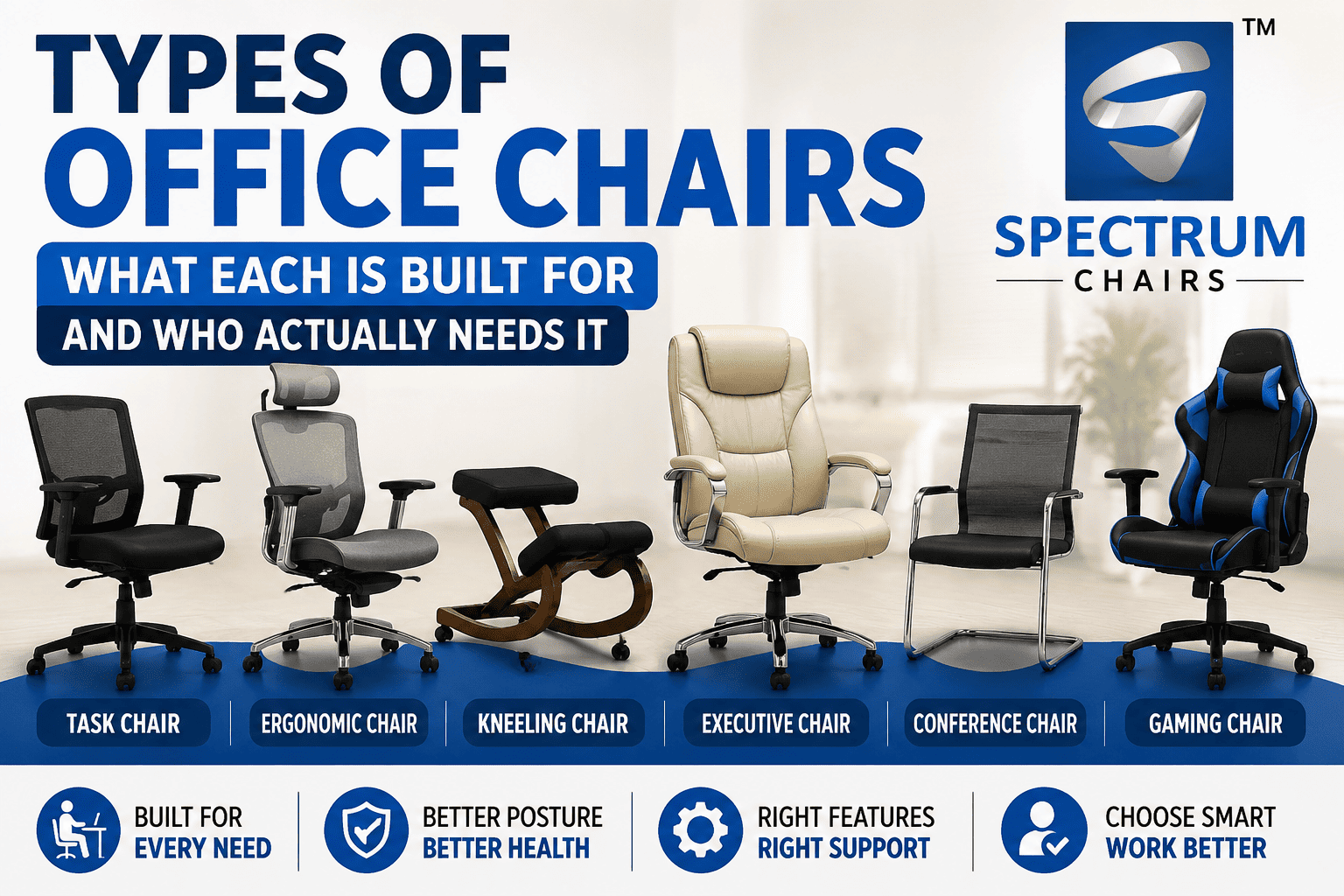
1. Task Chair — The Everyday Starter Chair
A task chair is the most common office chair you’ll find in homes and offices.
What it’s built for:
Light to moderate desk work (2–4 hours daily)
Key features:
- Adjustable height
- Swivel base
- Basic lumbar support
- Simple cushioning
Where it works best:
- Home study setups
- Light office use
- Short work sessions
The limitation:
Task chairs are not designed for long hours. Over time, lower-density foam compresses, and back support weakens. If you’re sitting more than 5 hours daily, you’ll quickly feel the difference.
Spectrum insight: Task chairs are a starting point—not a long-term solution for full-day desk work.
2. Ergonomic Chair — Built for Long Working Hours
This is where real comfort engineering begins.
What it’s built for:
6–9 hours of continuous daily use
Key features:
- Adjustable lumbar support
- Multi-angle recline
- Adjustable armrests (height, width, sometimes angle)
- Seat depth adjustment
- High-density foam and strong frame support
Where it works best:
- Work-from-home setups
- Corporate desks
- Long study or editing sessions
Why it matters:
An ergonomic chair adapts to your body instead of forcing your body to adapt to it. Over long hours, this difference directly affects posture, fatigue, and spinal health.
Spectrum insight: This is the only category designed specifically for full-day productivity.
3. Kneeling Chair — Posture Correction Seating
A specialized design that changes how your spine is positioned.
What it’s built for:
Short to moderate sessions with posture support focus
Key features:
- Forward-tilted seat
- Shin support pads
- Open hip angle posture
Best use case:
- Back pain relief routines
- Alternating posture setups
- Short focused work sessions
The limitation:
Not designed for full-day use. Pressure on knees and shins builds over time, making it unsuitable as a primary chair.
Spectrum insight: Think of it as a posture tool, not a full-time workstation chair.
4. Fixed Office Chair — For Visitors, Not Workstations
A simple, stationary chair with no wheels or swivel function.
What it’s built for:
Short sitting durations
Where it works best:
- Meeting rooms
- Visitor seating
- Reception areas
The limitation:
Not suitable for desk work. Lack of movement and adjustability makes it impractical for computer use.
Spectrum insight: Fixed chairs belong in front of desks—not behind them.
5. Executive Chair — Comfort Meets Presence
Executive chairs combine comfort with a strong visual identity.
What it’s built for:
Mid to long sitting with emphasis on appearance
Key features:
- High backrest
- Thick cushioning
- Leather or premium upholstery
- Solid, commanding design
Where it works best:
- Senior offices
- Cabin seating
- Client-facing workspaces
The trade-off:
While comfortable, executive chairs are often less adjustable than ergonomic chairs. They prioritize presence and aesthetics as much as posture support.
Spectrum insight: Ideal when visual authority matters as much as seating comfort.
6. Conference Chair — Designed for Meetings
A simple, purpose-driven seating solution.
What it’s built for:
Short duration sitting (1–2 hours)
Key features:
- Moderate cushioning
- Clean, uniform design
- Often stackable or lightweight
Where it works best:
- Meeting rooms
- Conference setups
- Training spaces
The limitation:
Not suitable for daily desk work due to limited support and adjustability.
Spectrum insight: Built for meetings, not for long work sessions.
7. Boss Chair — The Traditional Executive Symbol
A category deeply rooted in office culture, especially in India.
What it’s built for:
Authority, presence, and short-to-medium work durations
Key features:
- Oversized design
- Heavy cushioning
- High visual impact
- Leather or faux leather finish
The reality:
Boss chairs prioritize status and aesthetics more than ergonomic performance. They look powerful, but often lack modern adjustability.
Spectrum insight: A symbol of leadership—but not always the best choice for long desk hours.
8. Gaming Chair — Style-Driven Ergonomics
Originally inspired by racing seats, gaming chairs have become popular in home offices too.
What it’s built for:
Long sitting with visual and style appeal
Key features:
- Bucket-style seat design
- External neck and lumbar cushions
- Recline function
- Bold styling
The reality:
Performance varies widely. Some models offer solid ergonomic support, while others focus mainly on aesthetics.
Spectrum insight: Always evaluate adjustability—not just appearance.
9. Saddle Chair — Active Sitting Design
A specialized chair that changes pelvic alignment.
What it’s built for:
Posture engagement and standing-desk setups
Key features:
- Saddle-shaped seat
- Forward hip tilt
- Open leg positioning
Best use case:
- Drafting tables
- Standing desks
- Short posture-focused sessions
The limitation:
Requires adaptation and is not ideal for long continuous sitting.
10. Active Sitting / Balance Chair — Movement-Based Seating
These include wobble stools and unstable bases.
What it’s built for:
Core engagement and posture variation
Key features:
- Instability that activates muscles
- Encourages micro-movements
The limitation:
Not suitable for full-day use. Fatigue builds quickly without supportive rest.
Spectrum insight: Best used as a secondary seating option, not a primary chair.
11. Drafting Chair — For Elevated Workstations
Designed for higher-than-normal desks.
What it’s built for:
Standing desks and elevated work surfaces
Key features:
- Higher seat height
- Foot ring for support
- Adjustable lift range
Where it works best:
- Design studios
- Architecture work
- Standing desk setups
12. 24-Hour Chair — Built for Continuous Use
This is the heavy-duty category.
What it’s built for:
Round-the-clock usage across shifts
Key features:
- Reinforced frame
- High-density foam
- Heavy-duty mechanisms
- Extended durability
Where it works best:
- Security control rooms
- Hospitals
- Monitoring centers
Spectrum insight: Designed for nonstop operation—not standard office use.
What Really Matters: Hidden Specs Most Buyers Miss
Beyond categories, two technical factors determine long-term comfort:
1. Foam Density
- Low density foam compresses quickly (common in budget chairs)
- High density foam retains shape for years
2. Gas Lift Class
- Determines durability and height stability
- Higher class = stronger, longer-lasting performance
These two specs often matter more than branding or design.
Final Takeaway from Spectrum Chairs
Office chairs are not interchangeable. Each category exists for a reason—defined by time, posture, and environment.
The smartest way to choose is simple:
- First decide how you work
- Then match the chair category
- Then look at design and budget
Because when the foundation is right, comfort stops being a guess—and becomes a certainty.